 Powernotch
Powernotch: Battery Monitor
Every battery.
One glance.
Your Mac, keyboard, mouse and AirPods in one side panel that stays out of your way until you need it.
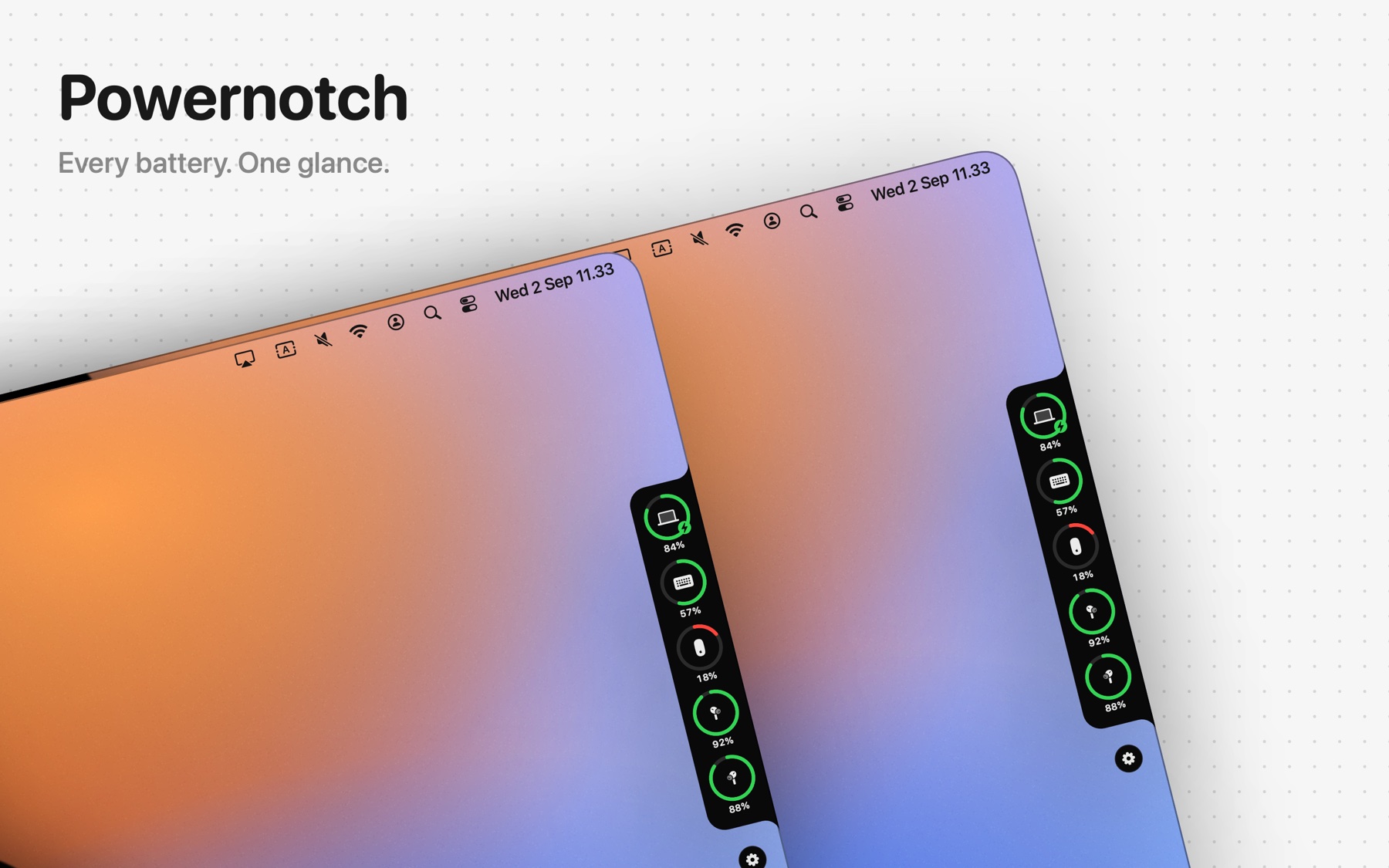
A panel on the side, not in your way.
A black panel with rounded corners at the left or right edge of any screen. It works on every Mac, with or without a notch.
Hides until you need it
A thin tab at the edge of the screen. Touch it with your mouse and the panel slides out. After a delay you choose, from 0.2 to 3 seconds, it slides back. Or keep it open all the time.
One ring per battery
Each device gets a ring with its icon and percentage. Green above 50%, yellow down to 50%, red at 20% or lower. A bolt appears while charging.
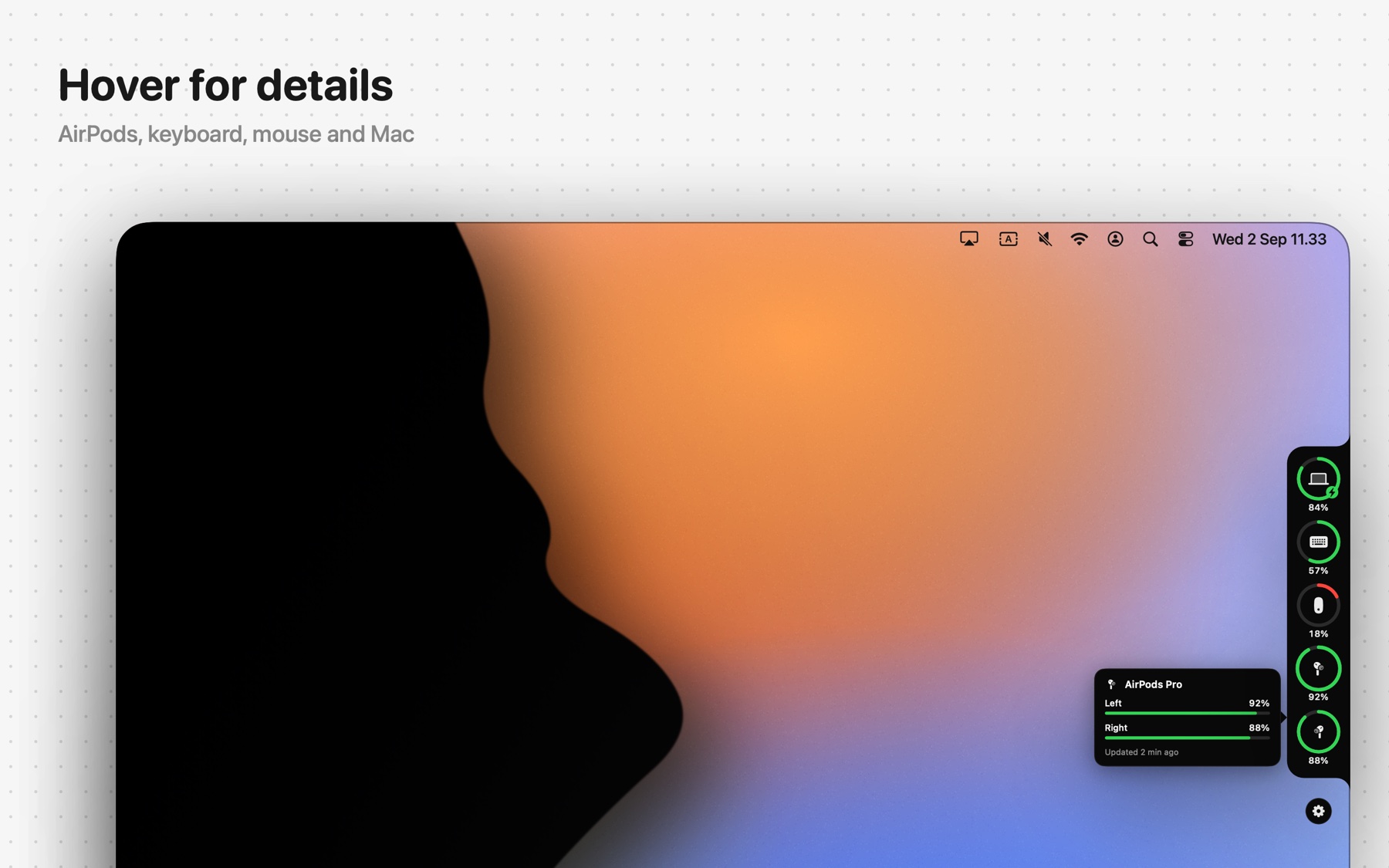
Hover for the details Pro
Move over a ring for a card with the name, percentage, charging status, remaining time for your Mac and when the value was last read. AirPods show left, right and case separately.
Everything macOS knows the level of.
MacBook
Air and Pro. Charging, full, time remaining.
Magic Keyboard
Updated the moment macOS does.
Magic Mouse
Updated the moment macOS does.
Magic Trackpad
Updated the moment macOS does.
AirPods
All generations, Pro and Max. Left, right and case.
Beats & headphones
Bluetooth headphones with a reported level.
Certain controllers
PlayStation and Xbox controllers with a reported level.
Other keyboards & mice
Logitech and others, when macOS reports a level.
AirPods in their case show as one ring for the case. Take them out and left and right get their own rings, or one combined ring if you prefer. Disconnected accessories stay visible, dimmed, with the last known level.
Try everything for 7 days.
Then keep the Mac battery for free, or unlock every accessory with Powernotch Pro. One purchase, no subscription, no account.
| Feature | Free | Pro |
|---|---|---|
| Side panel at the screen edgeLeft or right, vertical position, three ring sizes, percentages on or off | ✓ | ✓ |
| Auto-hide until the mouse touches the edge | ✓ | ✓ |
| Mac battery in the panel | ✓ | ✓ |
| Show over full-screen apps | ✓ | ✓ |
| Menu bar icon reflecting the lowest batteryOptionally with the percentage of the lowest battery or of the Mac | ✓ | ✓ |
| Full device list in the menu barEvery device with icon and percentage, plus show, peek, refresh, settings, quit | ✓ | ✓ |
| Launch at login, no Dock icon | ✓ | ✓ |
| Accessories in the panelKeyboard, mouse, trackpad, AirPods, headphones, controllers, each with a ring | – | ✓ |
| Detail card on hoverName, level, status, last update; AirPods left, right and case | – | ✓ |
| Low-battery notificationsPer device, threshold from 5% to 50%, one alert per discharge | – | ✓ |
| Device optionsHide devices, combine AirPods into one ring, show disconnected devices | – | ✓ |
Powernotch Pro
Every accessory in the panel, the detail card, notifications and device options. Yours after a single purchase in the app.
- 7-day trial of everything, no sign-up, no card
- No subscription, no yearly fee, no account
- Use it on your other Macs with the same Apple Account via Restore Purchase
- After the trial the free version keeps working
* Price may vary by country. The purchase happens inside the app, through the Mac App Store.
Nothing leaves your Mac.
Light
Driven by system events, no constant polling. 0% CPU when idle, around 1 MB on disk, vector drawing only.
Private
No account, no analytics, no tracking. Battery readings never leave your Mac. The app only goes online to check your purchase, and the only permission macOS asks for is Bluetooth, at first launch. Read the privacy policy.
Safe
Runs in the App Sandbox and is reviewed by Apple for the Mac App Store. Installs and updates through the App Store only.
Available in 34 languages, including English, Dutch, German, French, Spanish, Italian, Portuguese, Japanese, Korean and Chinese. Requires macOS 14 Sonoma or later on Apple silicon or Intel.
Questions, answered.
Do I need a MacBook with a notch?
No. The panel sits at the side of any screen, including an iMac, a Mac mini or an external display. The name refers to the shape of the panel, not the hardware.
Which devices do I see?
Your Mac, Magic Keyboard, Magic Mouse and Magic Trackpad, AirPods (left, right and case), Beats and other headphones, and certain controllers for which macOS reports a battery level. iPhone, iPad and Apple Watch are not shown: macOS does not share their batteries with apps.
My AirPods are in the case. Why do I see one ring?
While the pods sit in the case, Powernotch shows the case. Take them out and left and right get their own rings. Hover the ring to see all three levels.
How often is it updated?
Mac, keyboard, mouse and trackpad immediately. AirPods when they connect, when the panel opens and on an interval you set between 1 and 15 minutes.
What does it cost?
Downloading is free. After a 7-day trial the Mac battery stays free; Powernotch Pro is a one-time purchase inside the app. No subscription.
Can I use Pro on my second Mac?
Yes, with the same Apple Account. Choose "Restore Purchase" in the Pro window.
Does Powernotch collect data?
No usage data. There is no account, no analytics and no tracking, and what the app reads about your batteries stays on your Mac. The one thing that leaves it is the record of your in-app purchase, so Pro stays unlocked. Read the privacy policy.
Why does the app ask for Bluetooth?
To read the battery of your wireless accessories. It is the only permission Powernotch asks for.
How do I quit the app?
From the menu bar icon, choose "Quit Powernotch". Closing the settings window does not quit the app; it keeps running in the background.
I have a question or a problem.
Email [email protected]. Mention your macOS version and which device it concerns.
Questions about Powernotch?
Mail [email protected]. Include your macOS version and the device concerned.
Get Powernotch
Free on the Mac App Store, with a 7-day trial of every Pro feature. Nothing to sign up for.